TDS & TCS Compliance Software for Professionals and Businesses
Manage unlimited TANs, prepare regular and correction returns, review filing issues and complete key challan and TRACES-related workflows from one organised TDS system.
TaxPower TDS is offered as Professional Edition for tax professionals and Corporate Edition for companies and organisations managing their own TDS/TCS work.
Assisted trial for up to 3 TANs. View Pricing
Unlimited TANs
Manage multiple deductors and TAN records from one installation.
Regular + Correction Returns
Prepare regular returns and manage correction workflows for the relevant financial year.
TaxPower TDS is offered for two distinct user categories. Professional Edition is intended for professionals handling TDS/TCS work for clients, while Corporate Edition is intended for companies and organisations managing their own compliance.
For tax professionals managing multiple clients and TANs
The Professional Edition is intended for Chartered Accountants, tax practitioners, TDS consultants, compliance firms and other professionals handling TDS/TCS work for multiple clients.
It supports unlimited TAN management, regular and correction returns, validation, challan workflows, TRACES-related requests and downloads, reports and multi-user expansion.
Best suited for
For organisations managing their own TDS and TCS work
The Corporate Edition is intended for private limited companies, LLPs, limited companies, organisations and internal finance, payroll or accounts teams managing their own TDS/TCS compliance.
It provides a structured system for deductor data, employee and deductee records, return preparation, correction work, challan handling, filing review, reports and team-based access.
Best suited for
TDS return preparation is rarely limited to entering deductions and generating a file. Teams must work with deductor details, employee and deductee data, PAN validation, challans, tax shortfalls, interest, fees, FVU checks, correction statements and TRACES-related follow-up.
When these activities are handled through disconnected files, portals and manual follow-up, it becomes harder to identify pending work and maintain control over each TAN and return period.
Problem
Multiple TANs, deductors and return periods are difficult to track consistently.
TaxPower workflow
Maintain deductor records, select the relevant financial year and work with the applicable return workflow from one system.
Buyer benefit
Improved visibility across clients, TANs, periods and return stages.
Problem
PAN issues, short deductions, challan differences or filing errors may remain unnoticed until the filing stage.
TaxPower workflow
Use built-in validation, PAN checks, tax-shortfall review, interest and fee computation, challan mapping and FVU generation before proceeding.
Buyer benefit
Potential filing issues can be identified and reviewed earlier in the process.
Problem
Correction work requires access to earlier-period data and supporting files.
TaxPower workflow
Select the applicable financial year, work with available return data and use supported correction-return and TRACES-related workflows.
Buyer benefit
Current filing work and earlier-period correction work can be managed within the relevant return framework.
Problem
Team access and data handling become difficult when the software setup cannot support multiple users.
TaxPower workflow
Deploy TaxPower TDS in a standalone or server-based setup and add separately licensed client PCs where required.
Buyer benefit
Professional practices and organisational teams can configure access according to their working environment.
TaxPower TDS brings together the major activities involved in preparing, reviewing and managing TDS/TCS returns. The system is designed to support both day-to-day return work and the follow-up needed for correction, challan and TRACES-related processes.
Prepare regular returns and work with supported correction-return workflows for the applicable financial year and return format.
Manage unlimited TANs within the licensed edition. This is particularly useful for professional practices and teams handling several deductors.
Review PAN information, apply built-in validation and generate the FVU required for the filing workflow.
Identify possible tax shortfalls and review applicable interest or fee computations before proceeding with the return.
Review available challans, calculate tax, interest and fees, proceed to the Income Tax portal for payment, update the CIN in TaxPower TDS and map challans with return data.
TaxPower TDS does not process the bank payment. Payment is completed by the user on the official portal.
Work with supported TRACES-related requests and downloads, including applicable workflows for:
Maintain employee, deductee and transaction information required for return preparation and reporting.
Generate operational reports and MIS information to review return data, challans, deductees and filing activity.
Configure TaxPower TDS for standalone or multi-user working, maintain backups and receive onboarding, training and remote assistance.
TaxPower TDS helps users review return data and identify possible filing issues before the final filing process. The software supports a structured sequence of validation, computation, challan handling and FVU generation.
It supports review and decision-making but does not replace the user’s professional judgement or statutory responsibility.
Prepare the required deductor, employee, deductee and transaction data.
Review PAN, return and data-level validation issues.
Check tax, interest, fee and challan-related shortfalls.
Generate and review the FVU file and validation messages.
Resolve identified issues before proceeding with submission.
Complete authentication and submission through the Income Tax portal.
Apply built-in checks to identify missing, inconsistent or potentially incorrect information in the return workflow.
Use PAN verification and validation workflows to review deductee information before filing.
Check whether the available deduction and challan information indicates a possible shortfall. Review applicable interest and fee computations before proceeding.
Review available challans and compute tax, interest and fees where required. When payment is needed, the workflow can direct the user to the Income Tax portal. The user completes payment on the official portal and then updates the CIN in TaxPower TDS for mapping.
Generate the FVU through the applicable workflow and review validation results before continuing with filing.
TaxPower TDS provides built-in validation, PAN review, tax-shortfall checks, interest and fee computation, challan mapping and FVU generation. These workflows help users identify issues that may require review before the return is filed.
TaxPower TDS helps identify and review filing issues. It does not guarantee that every return will be free from errors, notices or later statutory queries.
TDS teams may need to prepare the current period’s return while also responding to correction requirements from earlier financial years.
TaxPower TDS allows the user to select the relevant financial year and work with the applicable return format and supported workflow.
Choose the financial year relevant to the return or correction work.
Enter or review the required deductor, deductee, transaction and challan information for the applicable return period.
Use supported correction-return workflows for changes that can be handled within the applicable return framework and available data.
Work with earlier-period returns and corrections by selecting the corresponding financial year.
Yes. Users can select the applicable financial year and work with current return formats, earlier-period returns and supported correction-return workflows. The precise steps depend on the return period, available data and the type of correction required.
The homepage does not represent that every possible correction scenario is supported or documented. Complex cases should be reviewed with the TaxPower support team before purchase or implementation.
TaxPower TDS is Microsoft Windows-based software powered by PostgreSQL Server. It can be configured for a single system or for multiple users according to the customer’s technical environment.
Core product data is stored on the PostgreSQL Server configured for the customer’s installation.
Internet connectivity is used for portal-linked workflows, activation, verification and applicable online services.
The software is installed with PostgreSQL and required components on a configured server or system within the customer’s selected environment.
TaxPower TDS can be used on a standalone system or configured for multi-user working.
Depending on the customer’s infrastructure and configuration, access may be provided through:
TaxPower TDS is not a native browser-based SaaS application.
Additional client-PC licences are available where a licensed deployment requires more than one system or user.
Unlimited TANs does not mean unlimited users.
Yes. TaxPower TDS can be configured for multi-user access through a locally configured server and separately licensed client PCs. Access can be arranged through LAN, WAN, VPN or a customer-managed Windows VPS, depending on the customer’s setup.
Core product data is stored on the PostgreSQL Server configured for the customer’s TaxPower TDS installation. Portal-linked activities require internet connectivity.
Begin with a focused 90-day assisted trial on one supported Windows PC for one user, using up to 3 TANs to evaluate the TaxPower TDS workflow.
The TaxPower team assists with installation, setup, activation and onboarding.
The TaxPower team assists with:
Trial activation uses the organisation’s and contact person’s details.
Email and mobile OTP verification are required as part of the activation process.
The remaining trial period is displayed within the product.
After the trial period ends, trial access stops and the user is prompted to contact TaxPower regarding continuation and licensing.
If you decide to continue, the TaxPower team can help you select the suitable edition and licensed deployment for your ongoing requirements.
The assisted trial includes TaxPower TDS installation, PostgreSQL and required component setup, organisation and contact registration, email and mobile OTP verification, onboarding and evaluation for up to 3 TANs. It is configured on one supported Windows PC for focused evaluation by one user.
Trial installation is assisted and subject to system compatibility and activation requirements.
Prices are uniform across India. GST is additional. Online onboarding and training are included. Product updates and support continue with the applicable financial-year renewal.
TDS software is most useful when the installation, data workflow and return process are properly understood by the people using it.
TaxPower customers receive online onboarding, training and remote assistance for supported product workflows.
TaxPower TDS is developed by Magnum Infosystem.
Dharankar Business Solutions Pvt Ltd markets, implements, trains and supports TaxPower TDS customers.
The Dharankar Business Solutions Pvt Ltd team assists customers with:
Product guidance and technical assistance are provided within the supported scope of TaxPower TDS. Customers remain responsible for factual data, statutory decisions, portal authentication and final filing approval.
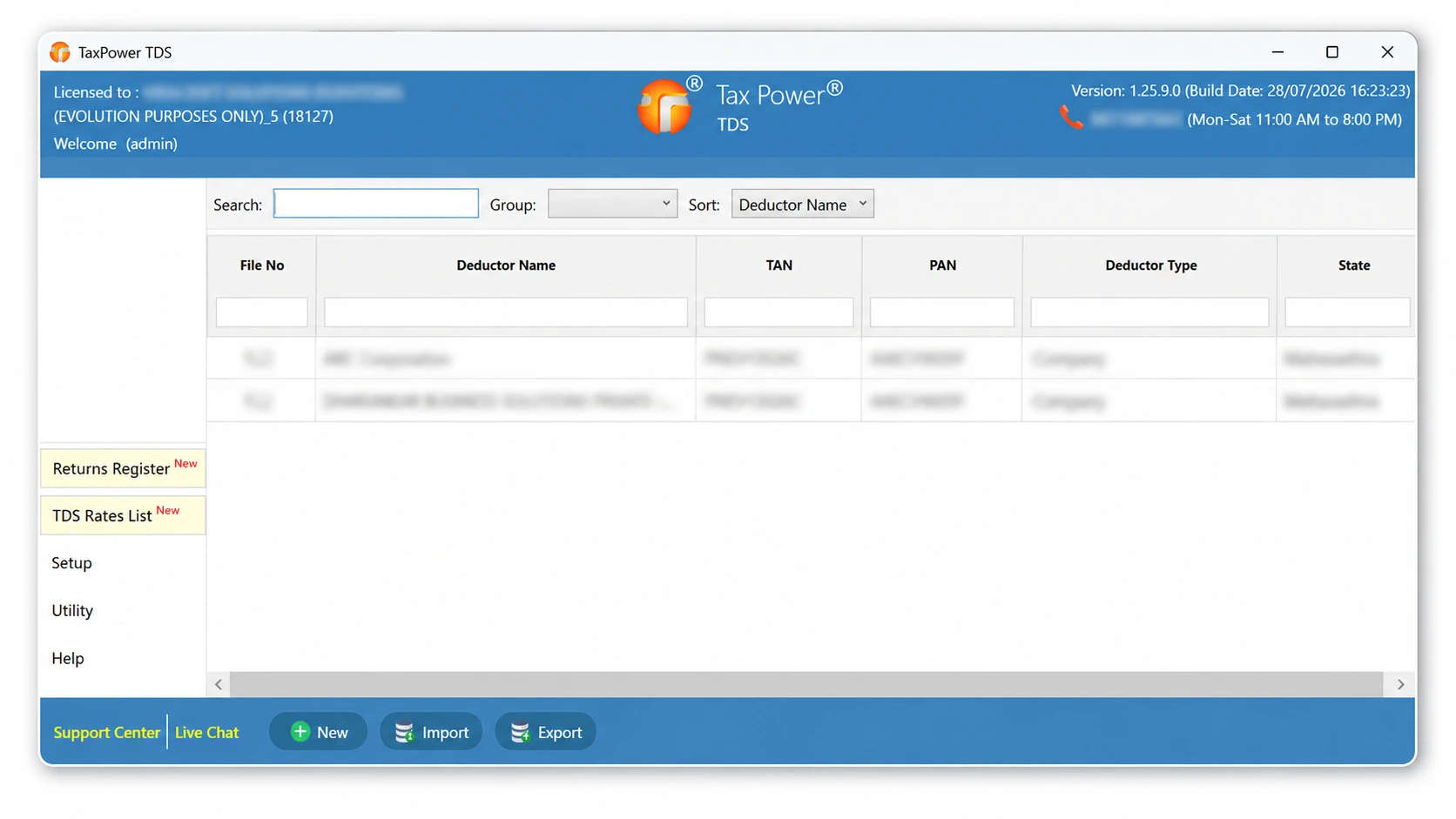
Review authentic TaxPower TDS screens to understand how TAN management, return preparation, validation, challans, TRACES-related workflows and reporting are organised.
View and manage deductor or TAN records from the TaxPower TDS workspace.
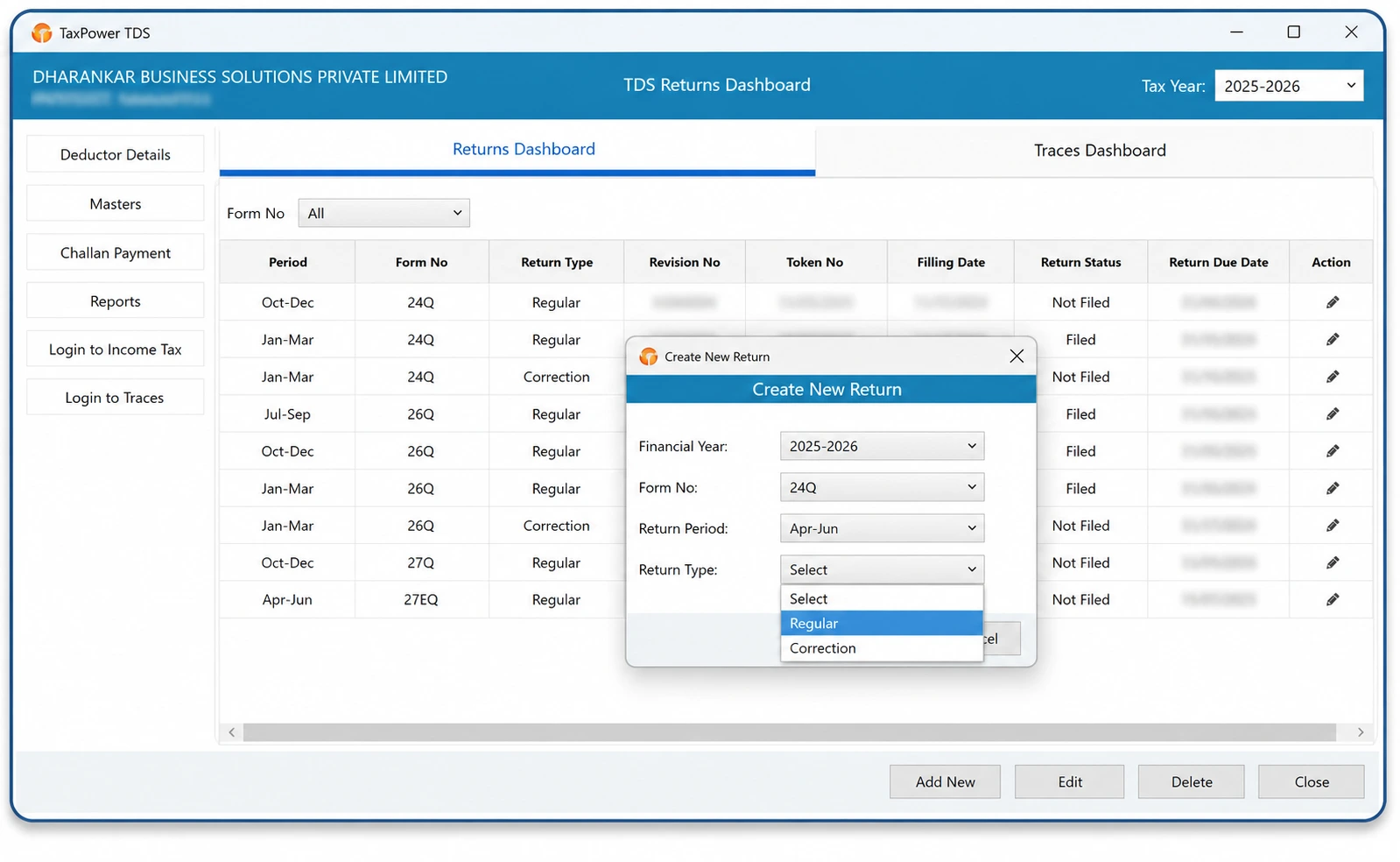
Select the relevant financial year and return period, then work with the applicable return-preparation workflow.
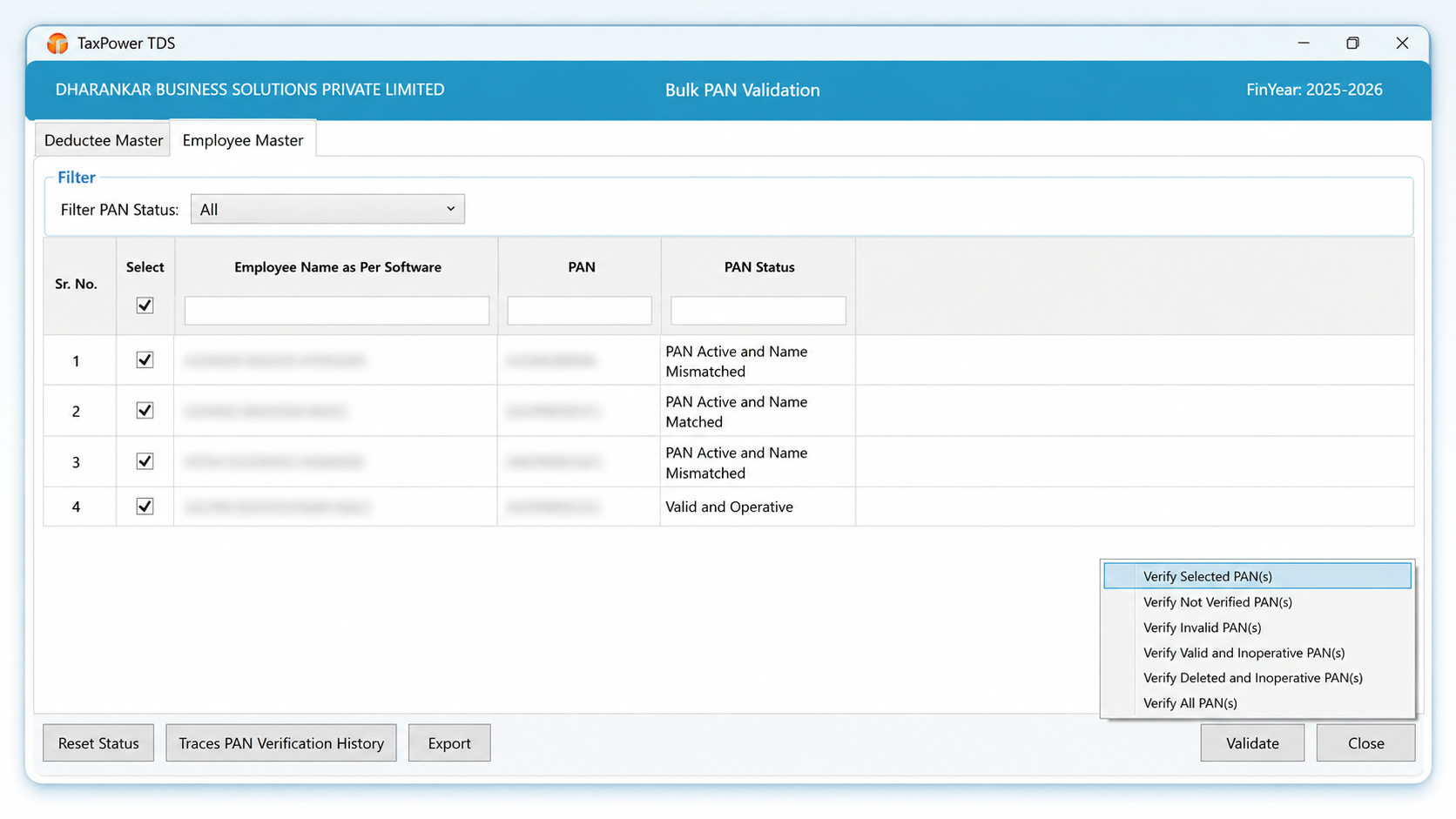
Review PAN information and identify records that may require attention before filing.
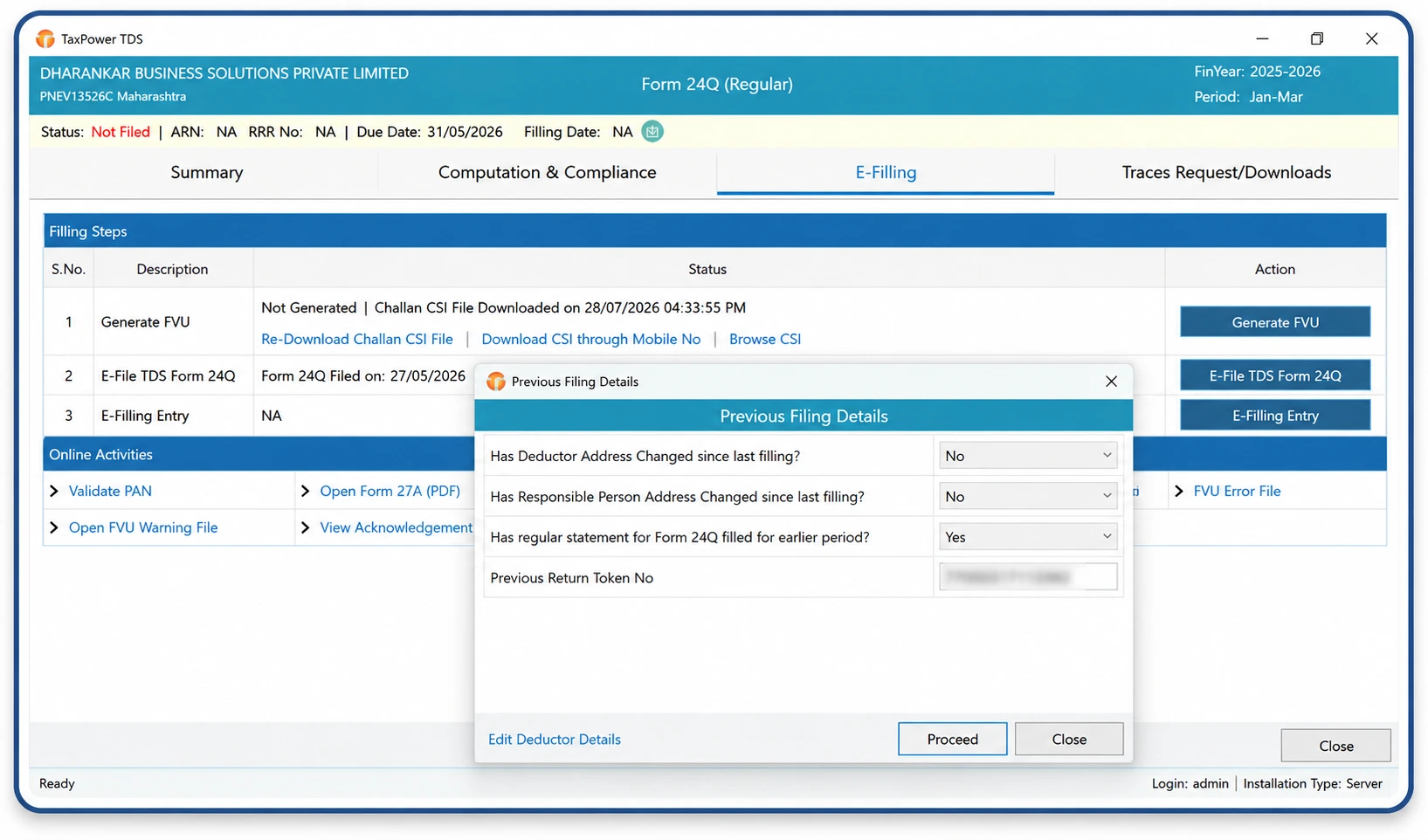
Generate the FVU and review validation results as part of the filing workflow.
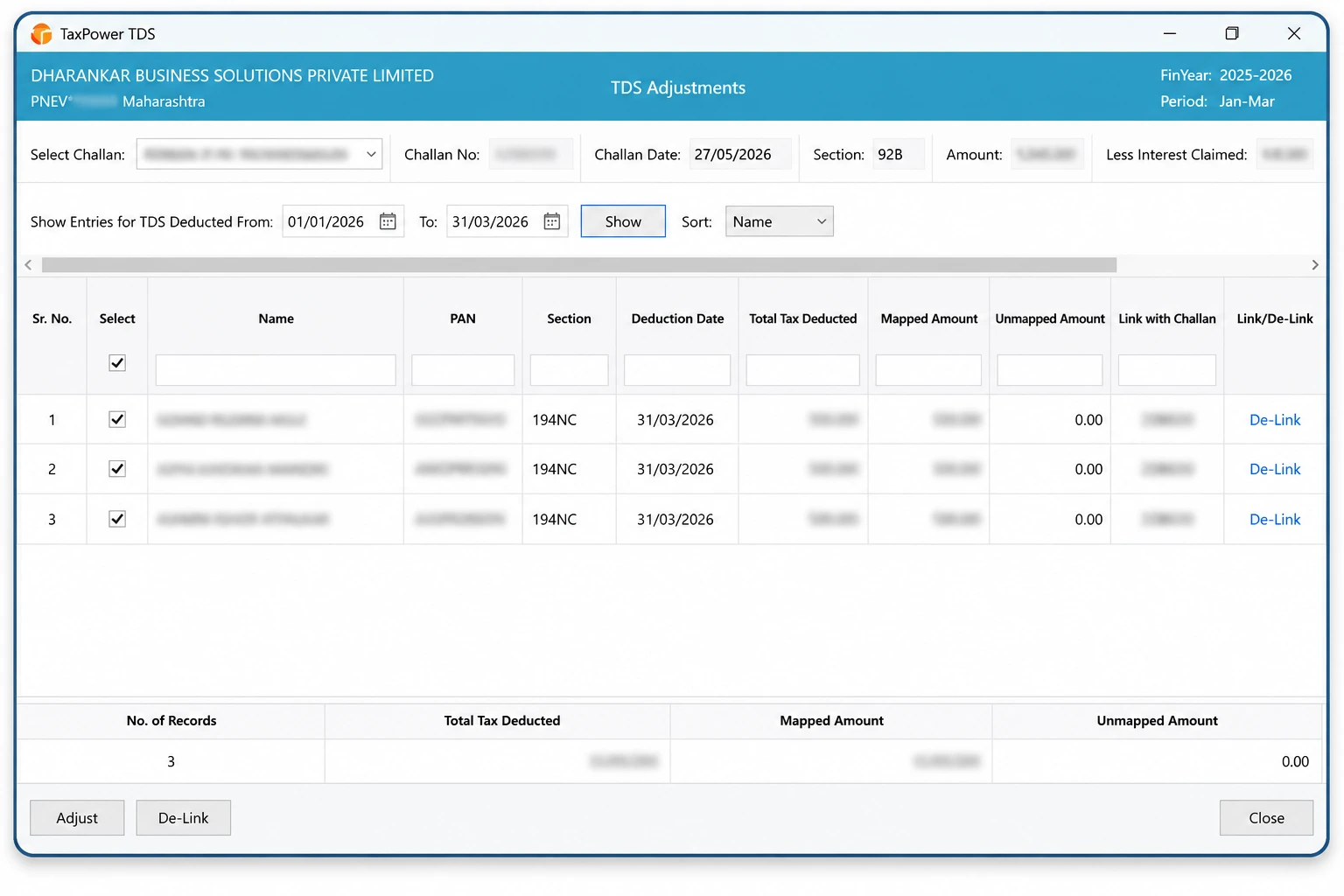
Review challans, compute applicable amounts, update CIN details and map challans with return data.
Bank payment is completed by the user on the official Income Tax portal.
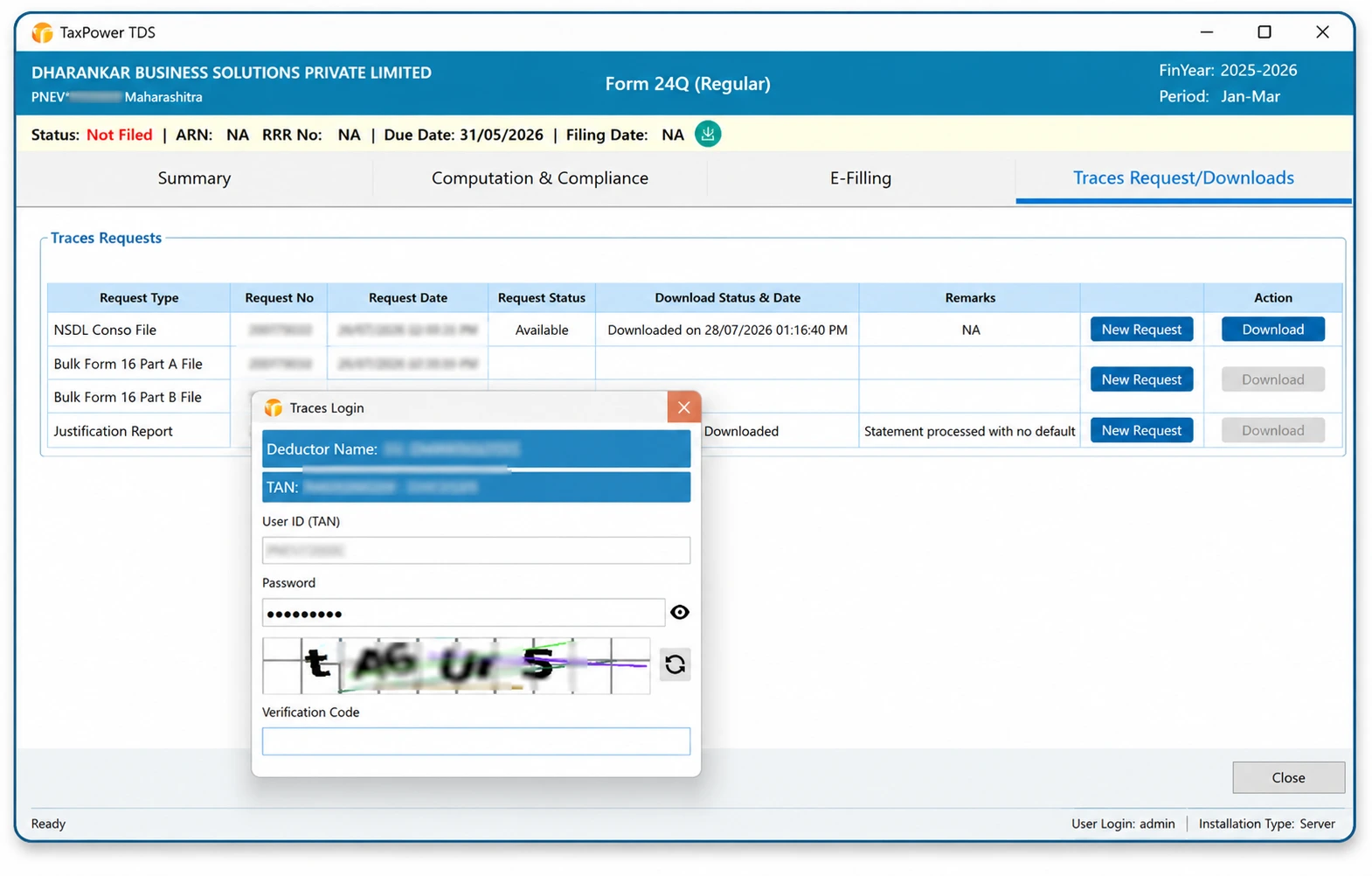
Work with supported requests and downloads for Conso files, Justification Reports, outstanding demands, challan details and other applicable TRACES-related records.
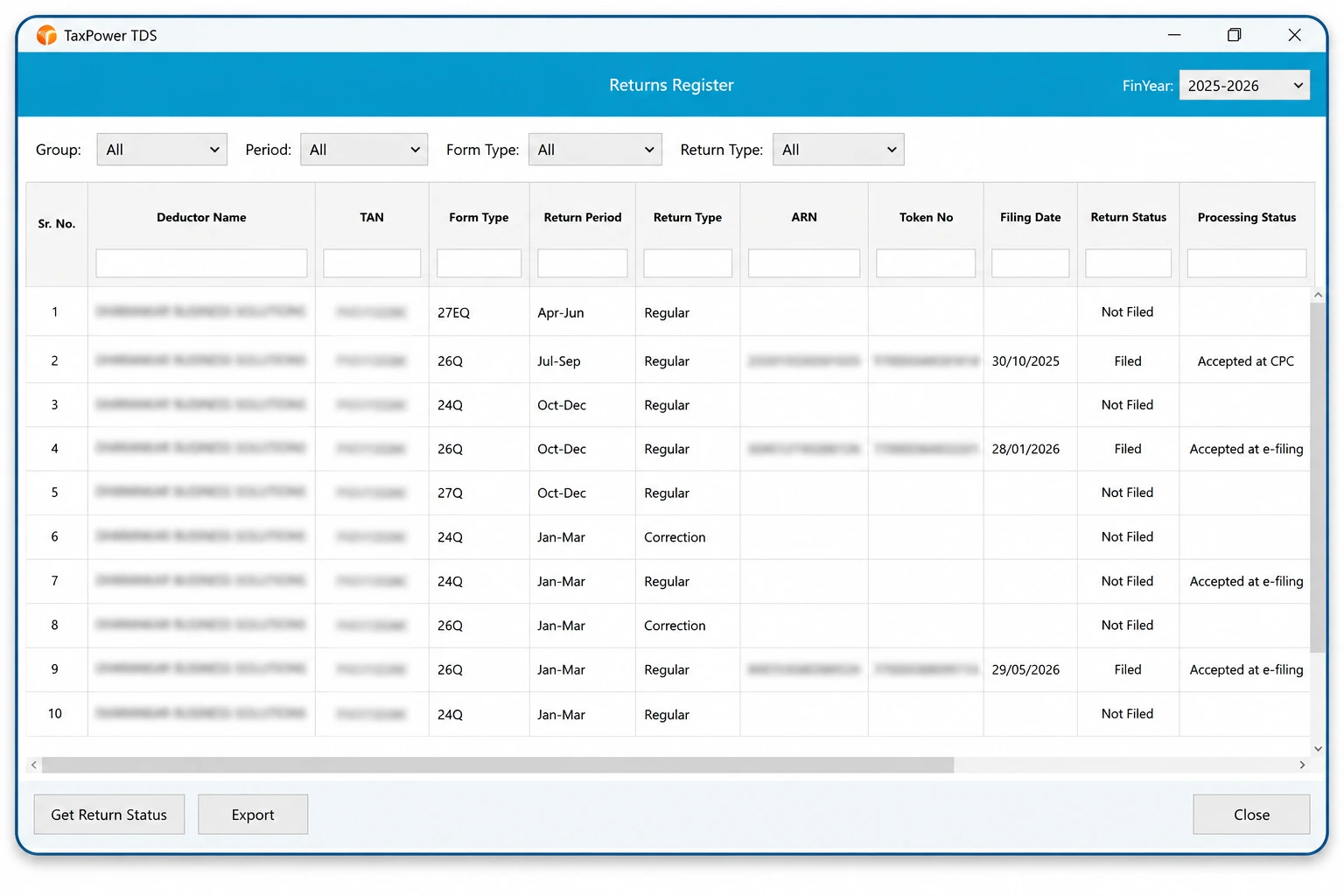
Review operational reports and MIS information for deductors, deductees, challans and return activity.
TaxPower TDS is TDS and TCS compliance software for tax professionals and businesses. It supports return preparation, correction workflows, TAN management, validations, challans, TRACES-related activities and reporting.
The Professional Edition is intended for Chartered Accountants, tax practitioners, TDS consultants, compliance firms and professionals managing TDS/TCS work for multiple clients and TANs.
The Corporate Edition is intended for private limited companies, LLPs, limited companies, organisations and internal finance, payroll or accounts teams managing their own TDS/TCS work.
Yes. Users can select the applicable financial year and work with current return formats, earlier-period returns and supported correction-return workflows. The available process depends on the period, data and correction requirement.
The software provides built-in validation, PAN review, tax-shortfall checks, interest and fee computation, challan mapping and FVU generation. These workflows help identify issues that may require review before filing.
Yes. The licensed setup can be configured on a server for multi-user access. Additional client-PC licences must be purchased separately, with access configured through LAN, WAN, VPN or a customer-managed Windows VPS where applicable.
Core product data is stored on the PostgreSQL Server configured for the customer’s TaxPower TDS installation. Internet connectivity is used for activation, verification and portal-linked workflows.
The assisted trial includes TaxPower TDS installation, PostgreSQL and required component setup, organisation and contact registration, email and mobile OTP verification, onboarding and evaluation for up to 3 TANs. It is installed on one supported Windows PC for focused evaluation by one user.
Choose the edition that matches your TDS/TCS work, review the software through a live demonstration or begin a focused 90-day assisted trial on one supported Windows PC for one user, with up to 3 TANs.
The TaxPower team will help you understand the product, confirm the suitable edition and coordinate trial installation and onboarding.
Professional and Corporate Editions available. Trial installation is assisted and configured for focused evaluation on one supported Windows PC.