TaxPower TDS Live Demo
See the TaxPower TDS workflows relevant to your work with guidance from the TaxPower team, then decide the most suitable next evaluation step.
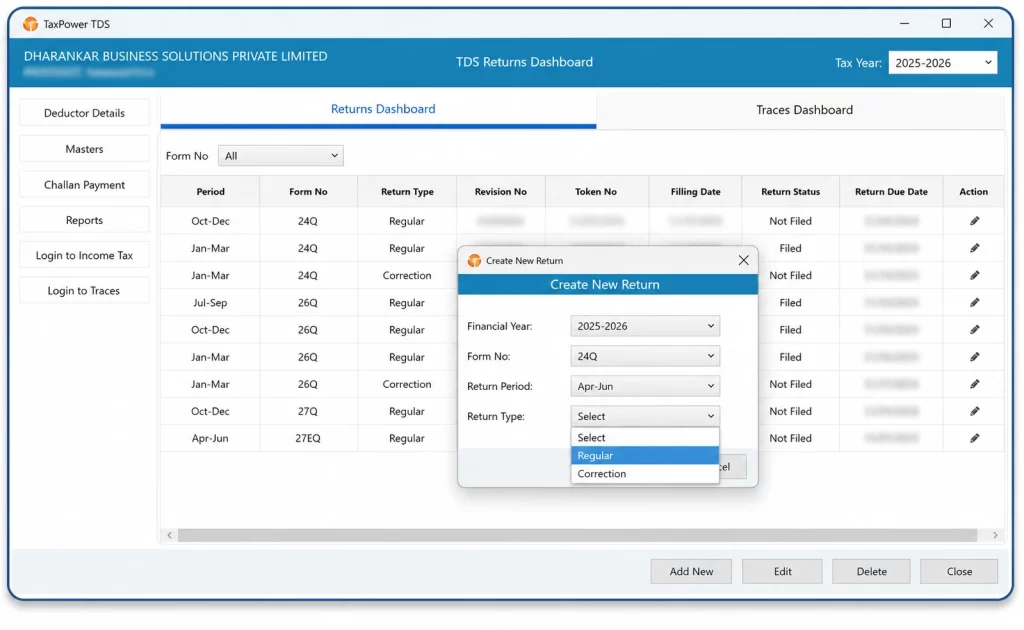
A guided demonstration helps you understand the product and relevant workflows before beginning a hands-on evaluation.
See authentic TaxPower TDS screens and understand how relevant supported workflows are organised within the software.
Understand whether Professional Edition or Corporate Edition matches the way you manage TDS/TCS work.
Ask practical questions about the workflows, product setup and evaluation points relevant to your professional practice or organisation.
TaxPower TDS is available in separate Professional and Corporate Editions. Choose according to whether you manage TDS/TCS work for external clients or for your own organisation.
For professionals managing TDS/TCS work for multiple external clients.
Suitable for:
A demo can focus on:
For organisations managing their own TDS/TCS compliance.
Suitable for:
A demo can focus on:
If you are unsure which edition fits your requirement, select Not Sure – Help Me Choose in the demo request form and the TaxPower team can help you identify the appropriate edition.
The demonstration can be focused on the areas most useful to your evaluation.
See how deductors, TANs, financial years and applicable working periods are organised within TaxPower TDS.
Review regular-return preparation and supported correction workflows, including earlier-period working where applicable.
See supported PAN and FVU validation, tax-shortfall review, applicable interest and fee computation and related review workflows.
Review the supported challan process, including calculation, review, official Income Tax portal payment handoff, CIN update and challan mapping.
Actual payment is completed by the user on the official Income Tax portal.
Review supported TRACES-related requests and downloads that may include, where applicable, Conso Files, Justification Reports, Outstanding Demands, Challan Details, TRACES Inbox and Applicable Bulk Certificate Files.
See available reports and registers used to review relevant deductor, deductee, challan and return information.
The demonstration can focus on the workflows most relevant to your requirement; it does not need to cover every feature in one session.
Share your basic contact information, preferred edition and the areas you would like to understand.
The TaxPower team reviews whether Professional Edition or Corporate Edition is relevant and which product workflows are most useful for your evaluation.
The TaxPower team contacts you during working hours to coordinate the demonstration.
Review the relevant TaxPower TDS workflows and ask practical product or setup questions.
After the demonstration, you can decide whether the appropriate next step is further product evaluation, the 90-Day Assisted Trial, a suitable licensed edition or an implementation discussion.
There is no need to decide before you understand the product and the relevant edition.
Both options support product evaluation, but they serve different stages of the buying process.
Best when you first want to understand TaxPower TDS with guidance.
Best when you are ready for hands-on evaluation.
The trial lets you work with TaxPower TDS in a focused evaluation environment when you are ready to move beyond the guided demonstration.
Tell us whether you are evaluating TaxPower TDS for a professional practice or for your own organisation and which workflows you would like to understand.
Share your basic contact details and the TaxPower team will use the information to coordinate the demonstration.
What Happens Next?
After you submit your request, the TaxPower team reviews the information provided and contacts you during working hours to coordinate the demonstration and understand which workflows are most relevant to you.
Need Assistance?
+91 7219789783
+91 7219789784
+91 9372267349
sales@dharankarsolutions.com
The Live Demo is a guided product demonstration with the TaxPower team. You can see workflows relevant to your requirement, understand the appropriate edition and ask practical product or setup questions before deciding your next evaluation step.
Choose Professional Edition if you manage TDS/TCS work for multiple external clients. Choose Corporate Edition if your company or organisation manages its own TDS/TCS compliance. If you are not sure, select Not Sure – Help Me Choose in the demo request form.
Yes. The demonstration can focus on workflows relevant to your requirement, such as return preparation, validation, challans, corrections, supported TRACES-related activities, employee salary computation for Form 24Q or other supported areas.
Yes. The demonstration can include regular-return preparation and supported correction-return workflows. Earlier-period working can also be discussed where applicable.
Yes. Where relevant, the TaxPower team can explain the licensed standalone or multi-user deployment options and separately licensed client-PC requirements during the demo.
Yes. If you want hands-on evaluation after the demonstration, you can request the 90-Day Assisted Trial. It is available for up to 90 days and up to 3 TANs on one supported Windows PC for focused evaluation by one user.
After you submit the request, the TaxPower team reviews the information and contacts you during working hours to coordinate the demonstration. Submitting the form does not automatically reserve a demo time.
Review the relevant Professional or Corporate Edition workflows with the TaxPower team and decide the next evaluation step with greater clarity.
Professional and Corporate Editions available.