
TaxPower TDS Features
TaxPower TDS Features for Practical TDS/TCS Workflows
Import and organise data, prepare and file returns, work with supported corrections, review PAN and FVU issues, coordinate challans and TRACES-related workflows, generate certificates and review reports in one organised Microsoft Windows desktop application.
Professionals can use TaxPower TDS around client and TAN-wise workflows, while organisational teams can use it around their own employee, vendor and related TDS/TCS work.
View Pricing • Professional and Corporate Editions available.
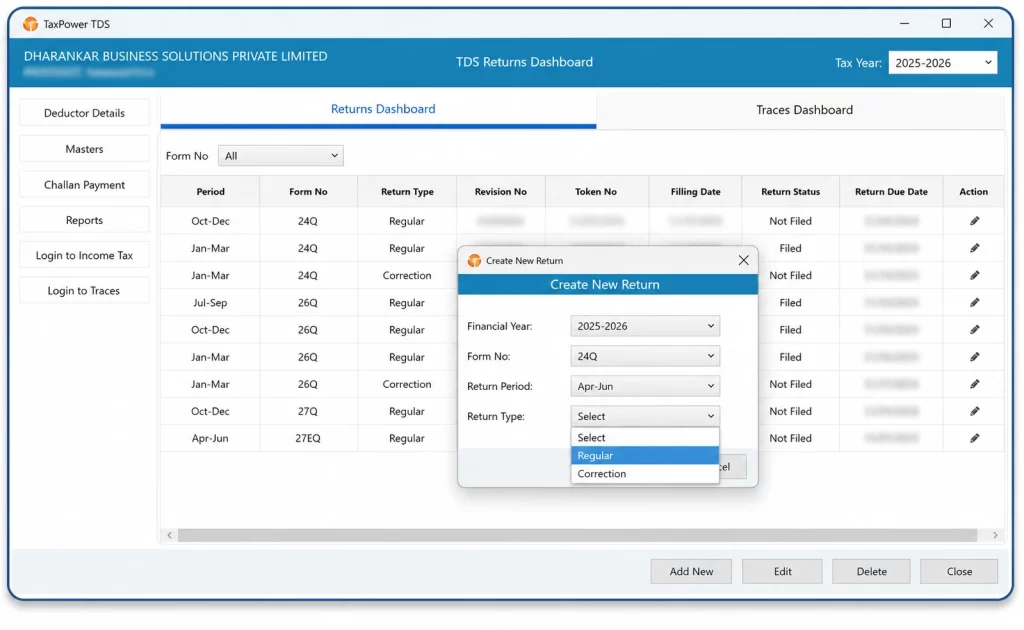
What Are the Core Features of TaxPower TDS?
TaxPower TDS supports data import through supported templates and formats, deductor and TAN management, structured regular-return preparation, supported correction workflows and the applicable Income Tax portal-filing workflow. It includes PAN and FVU validation, possible tax-shortfall review, applicable interest and fee computation, challan calculation, CSI and BIN utilities, CIN update and challan mapping.
Users can work with supported TRACES-related requests and downloads, certificate workflows, reports, Excel and PDF exports, backup and restore. TaxPower TDS also supports employee salary computation for Form 24Q and vendor or contractor deduction workflows where relevant. The licensed product can be configured for standalone or multi-user working through separately licensed client PCs, while users retain final control over review, authentication, payment and submission.
Choose the TaxPower TDS Edition Relevant to Your Work
Select the edition intended for your working context: professional client work or in-house organisational TDS/TCS compliance.
Professional Edition
For Professionals Managing Multiple Clients and TANs
For Chartered Accountants, Tax Practitioners, TDS Consultants, Compliance Firms and Professionals Handling Multiple Clients and TANs.
Common professional-use workflows include:
- Client and TAN-wise working
- Regular and supported correction returns
- Earlier-period working where applicable
- PAN and FVU validation
- Challan and supported TRACES-related workflows
- Reports, exports and licensed multi-user expansion
Corporate Edition
For Organisations Managing Their Own TDS/TCS Compliance
For Companies, Businesses, Organisations, Internal Finance Teams, Accounts Teams and Payroll Teams.
Common organisational-use workflows include:
- Employee salary computation for Form 24Q
- Vendor and contractor deduction workflows
- Organisation and TAN-wise working
- Regular and supported correction returns
- PAN/FVU validation and challan review
- Supported TRACES-related workflows
- Certificates, reports and licensed organisational deployment
Explore TaxPower TDS by Workflow
Import Data and Organise TAN-Wise Return Work
TaxPower TDS provides structured workflows for importing supported data, organising deductors and TANs and preparing the applicable return.
Import Data Through Supported Templates and Formats
- Deductor Import
- Excel-Template Import
- Overwrite Option
- Append Option
- Supported CSV / TXT Import
- Challan Import
- Conso-File Import
Import options work with supported templates and formats. Imported data should be reviewed within the relevant deductor, TAN and return context before filing.
Organise Deductors, TANs and Return Context
Maintain separate deductor and TAN records, select the relevant financial year and return period, and work with employee or deductee records in the applicable return workflow.
Prepare Regular Returns
Structured return preparation brings together employee or deductee information, transaction and deduction details, challan information, Form 27A generation where applicable, and FVU generation and review.
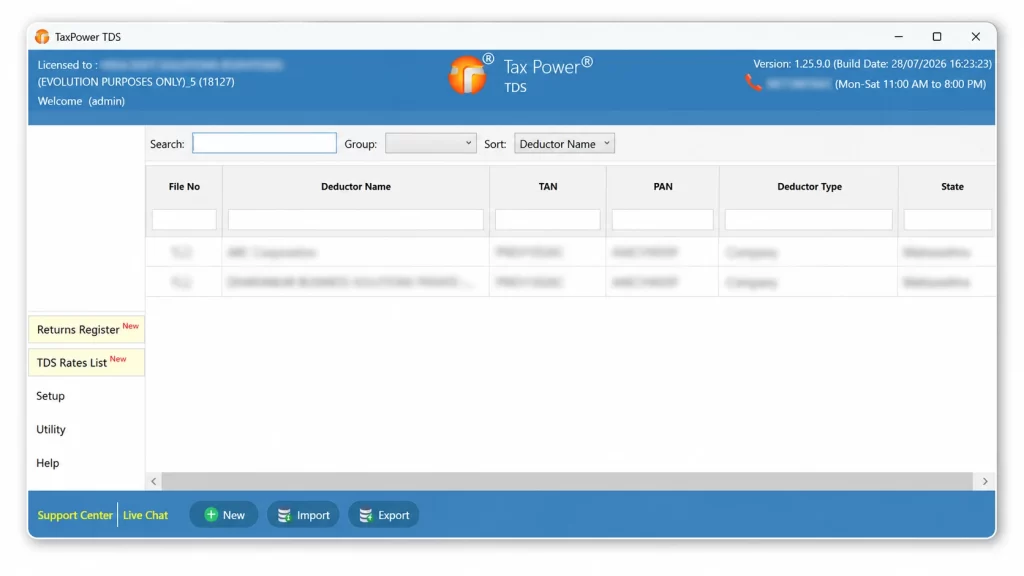
Manage deductors and TANs within TaxPower TDS.
Prepare, Correct and Complete the Applicable Filing Workflow
Use one organised workflow for current filing work together with supported correction and earlier-period requirements.
Complete the Applicable Portal-Filing Workflow
After return data has been prepared and reviewed, TaxPower TDS supports the applicable Income Tax portal-filing workflow.
- Select the relevant deductor, TAN, financial year and return period.
- Complete structured return preparation.
- Generate Form 27A where applicable.
- Generate and validate the applicable FVU.
- Review the return and validation results.
- Proceed through the applicable Income Tax portal workflow.
- Complete the required OTP or DSC authentication.
- Track the acknowledgement and retain the filing receipt.
The user reviews the return and completes the required portal authentication before final submission.
Work With Supported Corrections and Earlier-Period Requirements
Supported correction utilities may include:
- Conso-file processing
- Justification Report processing
- PAN modification
- PAN nullification
- Challan addition
- Correction log
- Available original-return data
- Supporting files
- Applicable FVU generation and validation
Users can select an earlier financial year and work with the applicable return or supported correction workflow for that period.
The applicable workflow depends on the return period, available data, supporting files and correction requirement. Specific or complex correction requirements can be reviewed during a Live Demo or assisted trial setup.
Review Return Data and Filing Issues Before Submission
TaxPower TDS provides structured review workflows that help users identify information, calculations or validation messages requiring attention before filing.
PAN Review and Bulk Verification
Review deductee PAN information and use the applicable PAN-validation workflow. Bulk PAN verification is available where supported by the relevant process.
FVU Generation and Validation
Generate the applicable FVU and review the resulting validation messages before proceeding.
Tax-Shortfall, Interest and Fee Review
Review whether available deduction and challan information indicates a possible tax shortfall, and review applicable interest or fee computations.
Challan Mismatch and Validation Messages
Identify challan information that may require updating, correction, verification or mapping, and address relevant validation messages before proceeding.
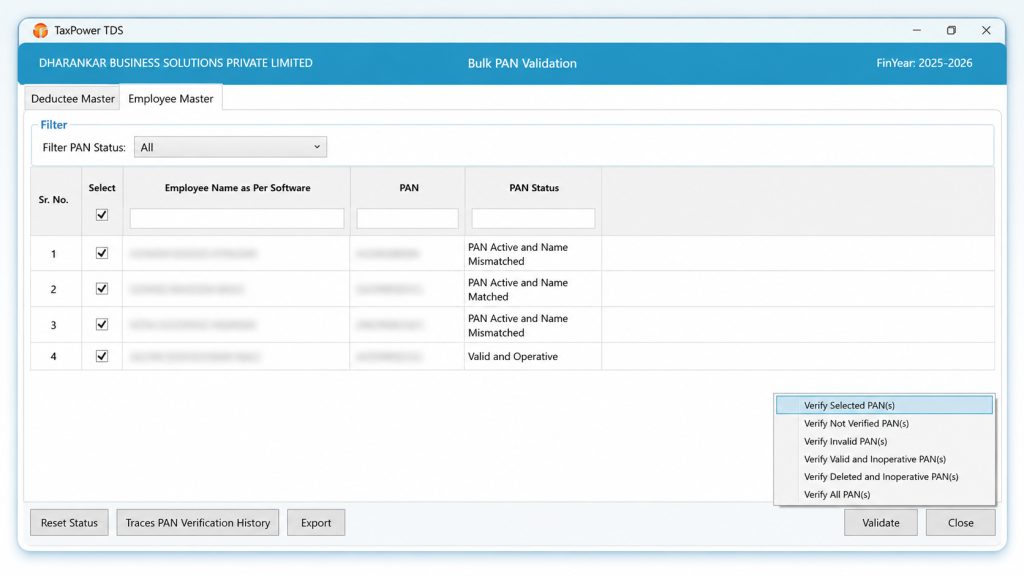
Review PAN information through the supported validation workflow.
Coordinate Challans and Supported TRACES-Related Work
Coordinate practical challan utilities with supported TRACES-related request, download and processing workflows.
Challan, CSI and BIN Workflow
Calculate and Review
Calculate applicable tax and review interest, applicable fees and available challan information.
Download, Verify and Import
Use supported workflows for CSI download, challan verification, supported challan import, supported challan-import options through TRACES and OLTAS BIN where applicable, BIN information and applicable official receipt download.
Complete the Portal and Mapping Workflow
When payment is required, proceed to the official Income Tax portal. After payment, update the relevant CIN details in TaxPower TDS, map the challan with the relevant return or deduction information and review the resulting position.
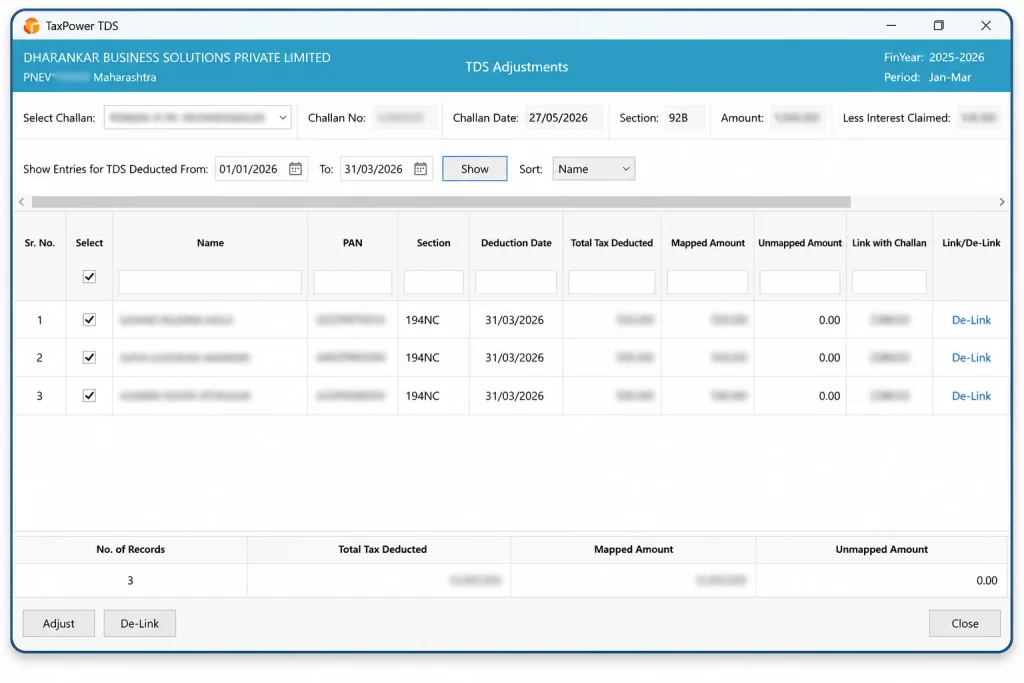
Review and map challans with the relevant return information.
Supported TRACES-Related Requests and Downloads
Supported TRACES-related workflows may include, where applicable:
- Bulk PAN verification
- Outstanding demands
- Challan details
- TRACES Inbox
- NSDL Conso files
- Conso-file processing
- Justification Reports
- Justification Report processing
- Applicable bulk certificate files
Users can raise the relevant supported request through TaxPower TDS. Availability depends on the applicable TRACES process, and the file can be downloaded or processed after it becomes ready on TRACES.
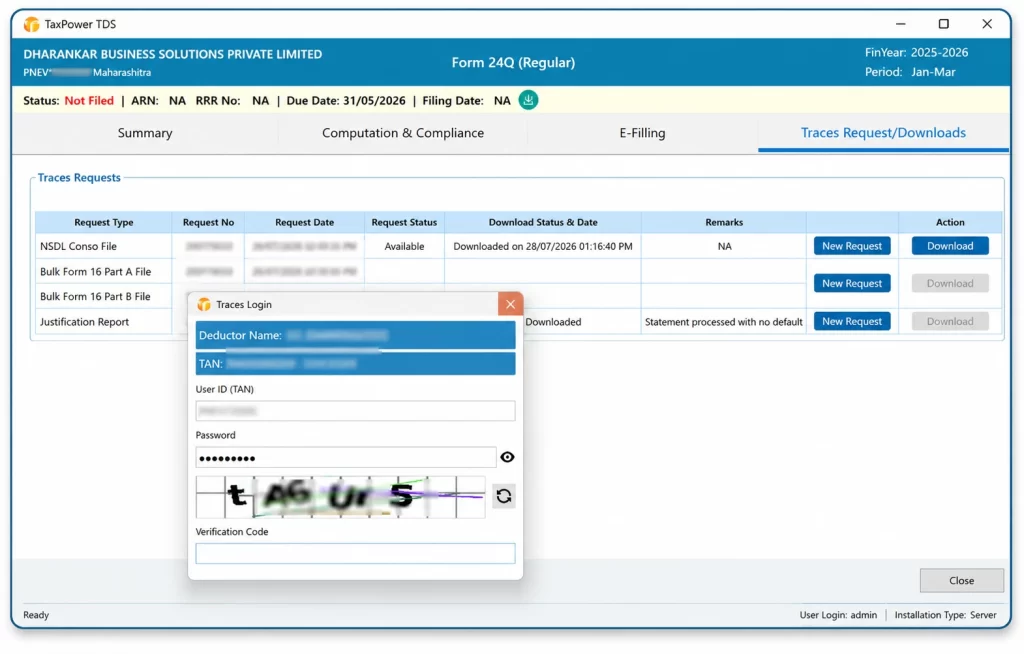
Access supported TRACES-related request and download workflows.
Prepare the Applicable TDS/TCS Certificate Workflows
TaxPower TDS supports certificate-generation workflows connected with applicable TDS/TCS returns.
Form 16 Part A and Part B
Work with the applicable Form 16 Part A and Form 16 Part B certificate workflow.
Form 16A
Prepare the applicable Form 16A certificate workflow for relevant deductee records.
Form 27D
Prepare the applicable Form 27D certificate workflow for relevant TCS records.
Applicable DSC Signing Workflow
Where DSC signing is required, the applicable signing step is completed through the relevant portal workflow.
Support Employee Salary and Vendor Deduction Workflows
For organisations managing their own TDS/TCS compliance, employee salary TDS and vendor or contractor deduction workflows are especially relevant.
Employee Salary Computation for Form 24Q
TaxPower TDS supports employee salary computation for Form 24Q under the applicable Old or New Tax Regime.
Salary components, allowances, applicable exemptions, perquisites, profit in lieu of salary and applicable other income considered for salary TDS.
Section 16 deductions and Chapter VI-A deductions.
Taxable income, tax liability, rebate, surcharge and cess where applicable, and the applicable Old or New Tax Regime.
TDS deducted and the resulting payable or refundable position where applicable.
This workflow is especially relevant to in-house payroll, finance and accounts teams handling organisational Form 24Q work.
Vendor and Contractor Deductions
Maintain and review applicable organisational deduction information for vendors, contractors and other deductees.
- Vendor or deductee records
- Section-wise deduction information
- Relevant challans
- Return preparation
- Validation
- Supported correction workflows
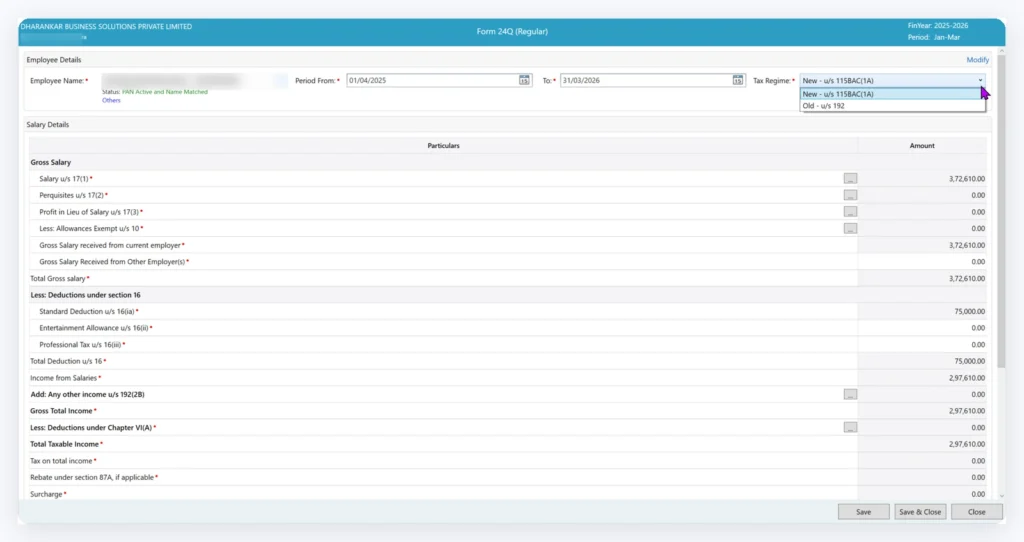
Calculate employee salary TDS for Form 24Q under the applicable Tax Regime.
Review Your Work and Configure the Licensed Setup
TaxPower TDS includes reporting, export, data-management and licensed deployment workflows that support professional practices and organisations.
Reports and Working Visibility
Available reports and registers include:
- Returns Register
- Challan Register
- Employee-Wise Statement
- Section-Wise Statement
- Salary Reports
- Quarterly / Compliance Reports
- Filing and processing-status visibility
- Relevant deductor, deductee, challan and return-period information
Reports support review and working visibility. Users remain responsible for professional and statutory review.
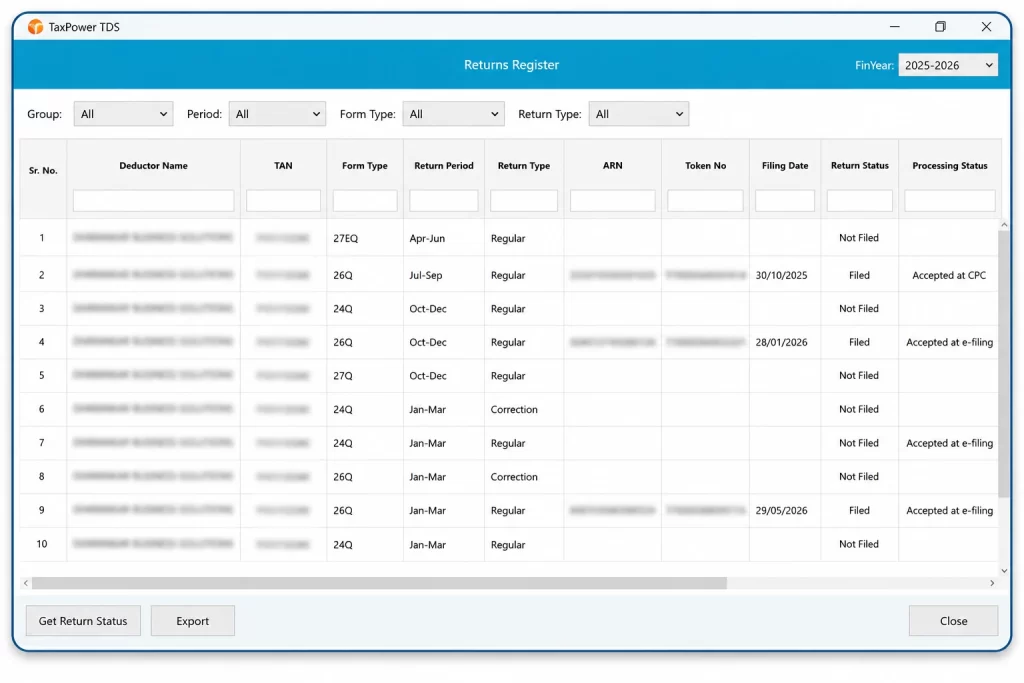
Review return information and filing or processing status.
Export and Productivity
Use Excel export, PDF export and bulk processing for supported product workflows.
Data Management and Backup
Core product data is managed through the PostgreSQL Server configured for the TaxPower TDS installation, with backup and restore facilities.
Licensed Deployment
TaxPower TDS is Microsoft Windows desktop software. The licensed product can be configured for standalone or server-based use with separately licensed client PCs and LAN, WAN, VPN or customer-managed Windows VPS access where applicable and configured.
Onboarding and Assistance
Assisted setup coordination, online onboarding, user training, remote assistance for supported product workflows, and licence or renewal assistance are available.
TaxPower TDS Supports the Workflow; Users Retain Final Control
TaxPower TDS is designed to organise practical TDS/TCS work while keeping review and final decisions with the user.
TaxPower TDS Supports
- Structured data preparation and supported imports
- Computation, PAN and FVU validation
- Review of possible filing issues
- Regular-return preparation and supported corrections
- Challan coordination and supported TRACES-related work
- Certificate workflows, reports and exports
- Filing and processing-status visibility
Users Retain Control Of
- Correctness and completeness of source data
- Statutory interpretation
- Review of calculations and validation results
- Portal credentials and payment approval
- OTP or DSC authentication
- Final return submission and compliance decisions
TaxPower TDS helps users work through the applicable process in a structured manner while preserving the review and approval required before filing.
Frequently Asked Questions About TaxPower TDS Features
Practical answers to common product, workflow, filing, reporting and edition questions.
What Are the Core Features of TaxPower TDS?
TaxPower TDS supports data import, deductor and TAN management, structured regular-return preparation, supported correction workflows, the applicable portal-filing workflow, PAN and FVU validation, challan utilities, supported TRACES-related requests and downloads, certificate workflows, reports, exports, backup and licensed deployment. It also supports employee salary computation for Form 24Q and vendor or contractor deduction workflows where relevant.
Which Data-Import Options Are Available in TaxPower TDS?
Supported import workflows include deductor import, Excel-template import, overwrite and append options, supported CSV or TXT import, challan import and Conso-file import. Import options work with supported templates and formats, and imported data should be reviewed within the relevant deductor, TAN and return context.
Does TaxPower TDS Support Regular Returns and Direct Filing?
Yes. TaxPower TDS supports structured regular-return preparation, Form 27A generation where applicable, FVU generation and validation, and the applicable Income Tax portal-filing workflow. The user reviews the return and completes the required OTP or DSC authentication before final submission. The supported workflow also includes acknowledgement tracking and filing-receipt storage.
Does TaxPower TDS Support Corrections and Earlier Financial Years?
Yes. Users can work with supported correction-return workflows and select earlier financial years where applicable. Correction utilities may include Conso-file processing, Justification Report processing, PAN modification, PAN nullification, challan addition, correction logs and applicable FVU generation and validation. The workflow depends on the return period, available data, supporting files and correction requirement.
Which PAN, FVU and Pre-Filing Review Features Are Available?
TaxPower TDS supports PAN validation, applicable bulk PAN verification, FVU generation and validation, possible tax-shortfall review, applicable interest and fee computation, challan mismatch review and validation messages. These workflows help identify matters that may require attention before submission.
How Does the Challan, CSI and BIN Workflow Work?
TaxPower TDS supports challan calculation, review of tax, interest and applicable fees, CSI download, challan verification, supported challan import, BIN-based challan import, BIN information, applicable official-receipt download, CIN update and challan mapping. When payment is required, the user completes the actual payment on the official Income Tax portal.
Which TRACES-Related Workflows Are Supported?
Supported workflows may include bulk PAN verification, outstanding demands, challan details, the TRACES Inbox, NSDL Conso files, Conso-file processing, Justification Reports, Justification Report processing and applicable bulk certificate files. Users can raise the relevant supported request through TaxPower TDS and download or process the available file after it becomes ready on TRACES.
Can TaxPower TDS Generate Form 16, Form 16A and Form 27D?
TaxPower TDS supports applicable certificate workflows for Form 16 Part A, Form 16 Part B, Form 16A and Form 27D. Where DSC signing is required, the applicable signing step is completed through the relevant portal workflow.
Can TaxPower TDS Calculate Employee Salary TDS for Form 24Q?
Yes. TaxPower TDS supports employee salary computation for Form 24Q under the applicable Old or New Tax Regime. The workflow can include salary components, allowances, applicable exemptions, perquisites, Section 16 deductions, Chapter VI-A deductions, taxable income, tax liability, rebate, surcharge, cess, TDS deducted and the resulting payable or refundable position where applicable. This workflow is especially relevant to organisational payroll, finance and accounts teams.
Which Reports, Export and Backup Options Are Available?
Available reports and registers include the Returns Register, Challan Register, Employee-Wise Statement, Section-Wise Statement, Salary Reports and Quarterly / Compliance Reports. TaxPower TDS also supports Excel export, PDF export, backup, restore, bulk processing and filing or processing-status visibility.
Does TaxPower TDS Support Unlimited TANs and Multiple Users?
TaxPower TDS supports unlimited TANs within the licensed setup. Unlimited TANs does not mean unlimited users. The licensed product can be expanded through separately licensed client PCs and configured for standalone or multi-user working through LAN, WAN, VPN or a customer-managed Windows VPS where applicable. The 90-Day Assisted Trial remains a one-PC, one-user evaluation for up to 3 TANs.
Which TaxPower TDS Edition Should I Choose?
Choose Professional Edition if you are a Chartered Accountant, Tax Practitioner, TDS Consultant, Compliance Firm or professional managing TDS/TCS work for multiple external clients. Choose Corporate Edition if your company or organisation manages its own employee, vendor and related TDS/TCS compliance. A Live Demo can help confirm the appropriate edition.
See How TaxPower TDS Fits Your Workflow
Review the Professional or Corporate Edition workflows relevant to your work through a guided Live Demo, begin a focused 90-Day Assisted Trial or review the applicable pricing before deciding your next step.