
TaxPower TDS Support and Product Assistance
Get practical help from Dharankar Business Solutions for TaxPower TDS installations, product workflows, licensed setups and renewals handled by our team. New users can also contact us for demo, trial and edition guidance.
Support at a Glance
- Working hours: 10:30 AM to 7:00 PM
- Sunday: Closed
- Remote assistance: Available
- Phone: +91 7219789783
+91 7219789784
+91 9372267349 - Email: sales@dharankarsolutions.com
DBS support coverage: Customers whose TaxPower TDS licence, implementation or ongoing support is handled by Dharankar Business Solutions Pvt Ltd. New product enquiries are welcome.
Former Viraj Infosoft customers: Dharankar Business Solutions Pvt Ltd is our current company name. If your TaxPower TDS licence or support was earlier handled by Viraj Infosoft Solutions Pvt Ltd, you can continue with the same DBS TaxPower support team.
What Can TaxPower TDS Support Help With?
TaxPower support is designed around implementation and practical software use. Choose the area closest to your requirement so the team can understand the context quickly.
Installation and Reconfiguration
Assistance with TaxPower TDS installation, supported setup steps and reconfiguration of an existing environment where applicable.
Onboarding and Training
Online onboarding and user training to help you begin using the relevant TaxPower TDS workflows.
Product Workflow Guidance
Help with supported return, correction, challan, TRACES-related, certificate, report and other product workflows according to the applicable edition.
Licence and Renewal Support
Assistance with licensed setup, renewal coordination and Additional Client PC requirements where applicable.
Multi-User and Deployment
Guidance for supported standalone or licensed multi-user deployments, including LAN, WAN, VPN or customer-managed Windows VPS environments.
Evaluation and Edition Guidance
If you are still evaluating TaxPower TDS, the team can route you to the right Professional or Corporate Edition, Live Demo, Trial or Pricing path.
Use the Right Route for Your Requirement
Already Using TaxPower TDS?
DBS-serviced customer (including former Viraj customers): Contact DBS Support for product usage, setup, reconfiguration, licence or renewal assistance.
Purchased through another dealer or directly from the developer: Contact your original seller or support provider for purchase-linked licence, renewal, installation or account-specific support.
Only need the setup file or compatibility information? Use the System Requirements & Downloads page first.
Evaluating TaxPower TDS?
If you are deciding whether TaxPower TDS fits your work, use the Live Demo, 90-Day Assisted Trial or Pricing pages. This keeps product evaluation separate from existing-customer support.
Before You Contact Support
Keeping a few details ready, including where your licence or support is handled, can make the support conversation more focused. Share only what is relevant to your issue.
- Where the TaxPower TDS licence or support is handled: Dharankar Business Solutions, another dealer or directly from the developer.
- Your TaxPower TDS edition and whether the setup is standalone or multi-user.
- The relevant organisation or TAN, financial year and return period where applicable.
- The exact screen, message or step where you need help.
- A screenshot of the message or workflow if it helps explain the issue.
- Your current TaxPower TDS version if available.
- For major reinstallations or environment changes, confirm that a current backup is available before proceeding.
Do not send passwords, OTPs or unnecessary confidential data by email. Share sensitive information only through the support process when it is genuinely required.
Show the Relevant Workflow Context
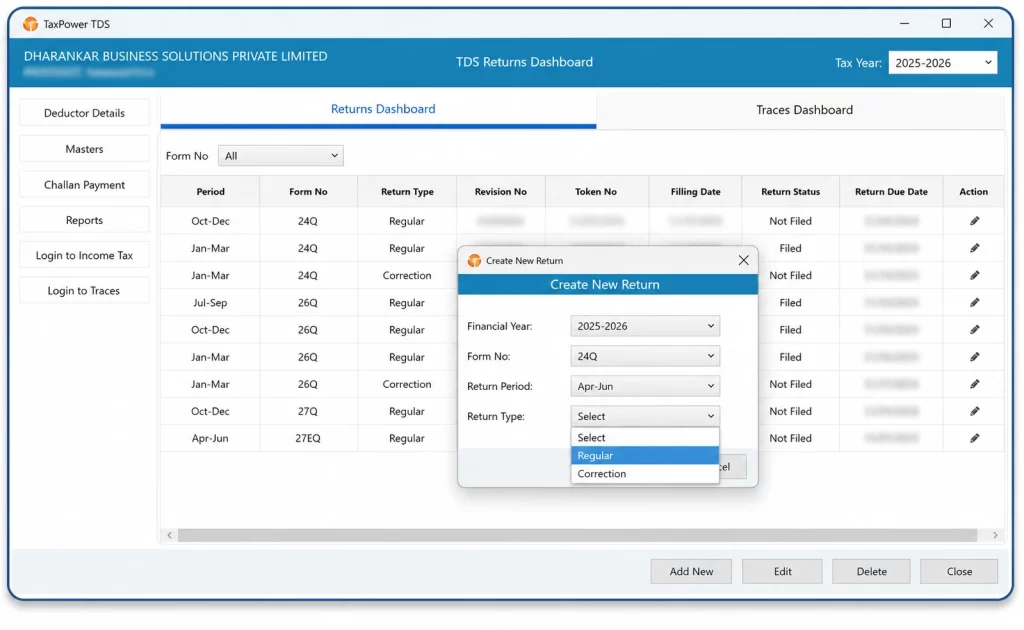
An authentic TaxPower TDS workflow screen. A clear screenshot or exact message can help the support team understand which part of the product you are working with.
Installation and Deployment Assistance
TaxPower TDS remains a Microsoft Windows desktop application. Support can help you understand the applicable setup path without turning every customer environment into the same technical configuration.
Standalone or Existing-PC Setup
Support can guide installation or reconfiguration on the supported Windows environment for the licensed setup.
PostgreSQL and Components
TaxPower TDS uses PostgreSQL. The setup handles required components in many installations; where a separate component needs attention, support can guide the correct sequence.
Licensed Multi-User Setup
Additional client PCs are separately licensed. Support can coordinate the applicable multi-user configuration for the licensed environment.
LAN, WAN, VPN or Windows VPS
Where applicable, licensed client PCs can work with the configured setup through LAN, WAN, VPN or a customer-managed Windows VPS.
Before a major reinstall, server change or environment reconfiguration: keep a current TaxPower TDS backup and contact support if the database or licensed setup is changing.
Online Onboarding and Training for Both Editions
Professional and Corporate Edition users have different working contexts. Support and training should follow the edition and workflow actually being used rather than mixing both audiences.
Professional Edition Support
For Chartered Accountants, tax practitioners, TDS consultants, compliance firms and professionals handling multiple clients and TANs.
Onboarding and workflow guidance can focus on multi-client working, return preparation, supported corrections, challans, TRACES-related activities, certificates, reports and the licensed office setup.
Corporate Edition Support
For companies, organisations and internal finance, accounts or payroll teams managing their own TDS/TCS compliance.
Onboarding and workflow guidance can focus on employee and vendor working, returns, validations, challans, supported corrections, reports and the organisation’s licensed setup.
Support With Clear Responsibility
TaxPower support can assist with the software, the licensed environment and supported product workflows. Users remain responsible for reviewing return data and completing the required portal authentication before submission.
Where an action is completed on the official Income Tax or TRACES portal, support can guide the related TaxPower workflow, but the user remains responsible for the official portal action and authentication.
Product support is practical software assistance and should not be treated as a substitute for professional tax or legal advice.
Who Supports TaxPower TDS?
TaxPower TDS is developed by Magnum Infosystem and marketed, implemented, trained and supported by Dharankar Business Solutions Pvt Ltd.
For customers whose TaxPower TDS licence, implementation or support is handled by Dharankar Business Solutions Pvt Ltd, DBS is the customer-facing team for product evaluation, implementation coordination, onboarding, user training, remote assistance, supported workflow guidance, licence and renewal support.
If the product was purchased through another dealer or directly from the developer, purchase-linked licence, renewal, installation or account-specific support should normally be taken through the original seller or support provider.
Frequently Asked Questions About TaxPower TDS Support
Practical answers about support, installation, contact routes and customer responsibility.
Who should contact Dharankar Business Solutions for TaxPower TDS support?
Customers whose TaxPower TDS licence, implementation or ongoing support is handled by Dharankar Business Solutions Pvt Ltd can contact our team. New demo, trial and product enquiries are also welcome.
What are the TaxPower TDS support hours?
Dharankar Business Solutions Pvt Ltd support hours are 10:30 AM to 7:00 PM. The support office is closed on Sundays.
How can DBS-serviced customers contact TaxPower TDS Support?
Call +91 7219789783, +91 7219789784 or +91 9372267349, or email sales@dharankarsolutions.com.
Can support help with TaxPower TDS installation?
Yes, for customers supported by Dharankar Business Solutions. We can assist with TaxPower TDS installation, relevant setup steps and applicable PostgreSQL or supporting-component guidance.
Can support help with a multi-user or server setup?
Yes, for DBS-serviced licensed setups. The licensed product can use separately licensed client PCs and can be configured through LAN, WAN, VPN or a customer-managed Windows VPS where applicable to the customer environment.
What should I keep ready before contacting support?
Keep the relevant edition, organisation or TAN, financial year or return period, exact screen or message, and a screenshot where useful. If a major reinstall or environment change is involved, keep a current backup available.
Can TaxPower Support complete portal authentication for me?
Users remain responsible for reviewing return data and completing the required portal authentication. Support can guide the related TaxPower TDS workflow but does not replace the user’s official portal responsibility.
Where can I download the TaxPower TDS setup?
Use the System Requirements & Downloads page for the current verified TaxPower TDS installer and applicable installation guidance.
Is support available for both Professional and Corporate Editions?
Yes. For customers supported by Dharankar Business Solutions, onboarding and training are available for both editions, with guidance aligned to the workflows and licensed setup relevant to that edition.
Can support help with licence and renewal questions?
Yes, for customers whose licence and support are handled by Dharankar Business Solutions. We coordinate licence and renewal support, including Additional Client PC requirements where applicable.
I purchased TaxPower TDS through another dealer or directly from the developer. Whom should I contact?
For purchase-linked licence, renewal, installation or account-specific support, please contact the original seller or support provider through whom your TaxPower TDS copy is handled. Dharankar Business Solutions remains available for new product, demo and trial enquiries.
Need Help With TaxPower TDS?
Customers supported by Dharankar Business Solutions can contact our team during working hours for installation, product workflow, licensed setup, onboarding, training or renewal assistance. New users are also welcome to contact us for demo or trial guidance.